Showing posts with label webcams. Show all posts

Friday, February 5, 2016

rsyslog for IQeye network cameras

The classic IQeye cameras (not Xilinx, Ambarella-based ones) include built in syslog daemons that will log to a syslog server of your choosing. 514/UDP naturally.

This applies to models like IQ7xx, IQ8xx, IQ5xx (not sure about IQ54x), but not IQx3x models like the IQ732 or IQ030s. Basically the MJPEG cameras, not the H.264 ones.

Why would I want this? Why even write the feature into an IP camera?

There are some great applications that can be written to take advantage of watching the logs sent by IQeye cameras:
  1. See and react to strange requests to strange URLs
    1. Your firewall will only watch IPs at layer 3, it is not aware of HTTP requests. Using syslog we can see what URLs are actually being requested by clients at layer 7 and determine if real people or bots are attempting to compromise generic HTTP services. If you are seeing Wordpress URL requests, you can gather IPs to block which are likely just compromised hosts.
  2. Trigger actions based on events
    1. FTP transactions (especially if you don't have the ability to set file watches using inotify on your FTP server)
    2. motion detected
    3. NTP updates
    4. DHCP renewals
  3. Requests for URLs like serverpush.html
    1. I had an incident where an internet user was changing my admin passwords. I leave my cameras with default passwords because I want people to explore a bit. It's interesting to see who stumbles into the honeypot!
  4. Advanced logic such as detecting motion..changing lighting settings...displaying currently connected clients on a map..
    1. By design the inbuilt webpages use JavaScript to make requests to the onboard "API" using OIDs
  5. Detect client connections and update a status board

Using the syslog, you can generate a report of the most frequently requested files, and where the client IPs are located. You can also correlate this with your iptables log to get an idea who's requesting what from where.


Caveats

One drawback of getting the HTTP requests is that this level of logging also includes the FTP operations for triggered events. You'll need to grep through all of this to distinguish the entries.

Another consideration is security. Like all syslog logging the data over port 514 is in clear text. syslog is lossy, it operates over UDP 514. There is no guarantee of data being delivered.

How to enable logging

Telnet into the camera

SET LOGGING DESTINATION IP 207.7.34.3

or whatever your syslog server is...

Set logging levels, higher numbers are higher verbosity:

SET LOGGING NETWORK { 1-4 }
SET LOGGING IP { 1-7 }
SET LOGGING COMMANDS { ENABLED|DISABLED }
SET LOGGING TRIGGER { MOTION|RELAY|ALL }

Different events can be sent to different syslog servers:

SET LOGGING IP MAX DESTINATION IP 75.7.53.10
SET LOGGING COMMANDS ENABLED DESTINATION IP 129.7.23.21

Remember to save your settings!

SAVE LOGGING

Sample Log Entries

Motion detected, camera begins writing JPEGs:

<13>1 2015-02-13T17:18:13.070497-06:00 source command - - - command: ftp trigger trig-*.jpg trig+*.jpg
<151>1 2015-02-13T17:18:13.083371-06:00 iqeye220e83.jay.lan NOOP - - - NOOP
<151>1 2015-02-13T17:18:13.094767-06:00 200 NOOP - - - NOOP command successful#015#012
<151>1 2015-02-13T17:18:13.097009-06:00 iqeye220e83.jay.lan PASV - - - PASV
<151>1 2015-02-13T17:18:13.105143-06:00 227 Entering - - - Entering Passive Mode (192,168,16,119,220,64).#015#012
<151>1 2015-02-13T17:18:13.106772-06:00 STOR 17_18_11.trig-04.jpg.tmp - - - 17_18_11.trig-04.jpg.tmp
<151>1 2015-02-13T17:18:13.118378-06:00 150 Opening - - - Opening BINARY mode data connection for 17_18_11.trig-04.jpg.tmp#015#012
<151>1 2015-02-13T17:18:13.190253-06:00 RNFR 17_18_11.trig-04.jpg.tmp - - - 17_18_11.trig-04.jpg.tmp
<151>1 2015-02-13T17:18:13.196035-06:00 350 File - - - File or directory exists, ready for destination name#015#012
<151>1 2015-02-13T17:18:13.196412-06:00 RNTO 17_18_11.trig-04.jpg - - - 17_18_11.trig-04.jpg
<151>1 2015-02-13T17:18:13.207172-06:00 250 Rename - - - Rename successful#015#012

Client connects via web interface:

<150>1 2015-02-13T17:20:29.742021-06:00 iqeye220e83.jay.lan HTTP - - - HTTP: request style.css from 98.174.251.203
<150>1 2015-02-13T17:20:29.855949-06:00 iqeye220e83.jay.lan HTTP - - - HTTP: request gui.js from 98.174.251.203
<150>1 2015-02-13T17:20:29.856678-06:00 iqeye220e83.jay.lan HTTP - - - HTTP: request vid.js from 98.174.251.203
<150>1 2015-02-13T17:20:29.857385-06:00 iqeye220e83.jay.lan HTTP - - - HTTP: request lib.js from 98.174.251.203
<150>1 2015-02-13T17:20:31.225316-06:00 iqeye220e83.jay.lan HTTP - - - HTTP: request now.jpg?snap=spush?ds=1?dummy=1423869627585 from 98.174.251.203
<150>1 2015-02-13T17:24:36.800627-06:00 iqeye220e83.jay.lan NTP - - - NTP: accepted packet from 209.118.204.201

I'm still not clear on what the prepended <###> field is. Seems I need to study my syslog knowledge.

Happy Hacking!

Sunday, April 13, 2014

IQeye Pricing

IP cameras used to be very expensive devices. The prices have dropped dramatically just in the last 2 years, and used cameras of megapixel quality are available for quite a deal. Even new cameras are affordable, especially Chinese models and knock-offs on eBay.

Here are some prices you can expect to get for used IQeye cameras by IQinvision as of June 2014. This will give you a better idea of how to negotiate.

These are prices without lenses, unless otherwise noted.

IQ511 $40
IQ541 $45
IQ542 $50
IQ702 $60
IQ703 $65
IQ711 $50
IQ732N $110
IQ751 (Day/Night) $65
IQ752 (Day/Night) $70
IQ753 (Day/Night) $80
IQ801 $80
IQ802 $90
IQ803 $100
IQ832N (Day/Night) $130
IQ851 (Day/Night) $100
IQ852 (Day/Night) $110
IQ853 (Day/Night) $130
IQM31N (Day/Night) lens included $100
IQM32N (Day/Night) lens included $120
IQA13N (Day/Night) lens included $100
IQ030S lens included $65
IQ031S lens included $75
IQ032S lens included $85
IQ040S lens included $50
IQ041S lens included $60
IQ042S lens included $70

For comparison, in 2006 an IQ511 would sell for over $800!

Some explanation of the methodology behind this:
  • Outdoor cameras are more expensive than indoor, because of the weatherproof box in addition to the camera itself.
  • Higher resolution cameras are more expensive than lower resolution ones...go figure.
  • Night/Day cameras (anything with an "N" in the list above) are more expensive, as they have a movable IR-Cut filter. This mechanical component is more expensive to implement. Or you can do it cheaply like Foscam does. They have an endemic problem with this on their cheaper models.
  • No IQeye cameras are wireless
  • Most IQeye cameras do not come with lenses, cameras with lenses are more expensive
  • Cameras with H.264 are more expensive

Saturday, April 5, 2014

Why use IP cameras over webcams or analog cameras?

I've asked myself this very question before, many times!

It used to be that IP cameras were very expensive. Most large deployments of CCTV systems would use analog cameras due to the high per-unit cost of IP cameras. Also, the reliability of early IP cameras was not fantastic, due to the early implementations of the technology mixed with the number of tasks that IP cameras were expected to perform, given their higher cost.

Around 2007 when I started looking into my own CCTV setups, the solution used to be to spend $60/each on analog NTSC cameras, run coax and power cables to a computer with lots of capture inputs. 4-input capture cards could be had for $25/each on eBay at that time. This meant your first camera cost only $85, and this cost scales down for each additional camera, because no additional capture hardware is necessary until you exceed the inputs on your capture card or the processing limits of your PC.

Alternatively, USB cameras were considered an option due to their relatively low cost and the ability to get higher resolutions as compared to analog cameras, but this meant having a USB host (read: computer) do the encoding and handling of the video, which contributed to high cost and poor scalability. USB cables can only be run for about 12 feet, and entailed the extra complexity of managing computers and software to keep them running properly. However, if you were say, Catherine and her Bird Boxes, and your computer was very close to the place you wanted to take video, then it was an acceptable solution.

At that time (2007), IP cameras were not readily available for prices under $300, and this cost did not scale down over time as you added cameras.

This has changed now that ARM CPUs with integrated processing, and good CMOS sensors can be packaged into IP cameras that are easily under $100 each.

Here are some benefits of using digital IP cameras over analog.

Single cable

Most IP cameras utilize a single Ethernet cable that provides both control/image data with power using the 802.3af (Power over Ethernet, or PoE) standard. This means that only a single cable is required for each camera.

Progressive scan

Most IP cameras are progressive scan, which means that every frame contains a full image, not an alternating field of lines as with analog cameras. Analog video, called NTSC video, functions by sending half resolution frames at 60Hz, which tricks the human eye into thinking that a full resolution image is being seen at 30Hz or 30 frames per second. It's a hack to get around the fact that there was not enough technology to deliver full frames at 480lines at 30 frames per second for most of TV's history.

Interlaced video is fine in most cases, except in high-motion situations. In high-motion scenes, the subject will often move slightly between the time that the first and second set of lines (or fields) are captured, resulting in two half frames with slightly different images. This results in the combing effect as seen below, where the car has moved between each frame.


In contrast, IP cameras, and USB cameras for that matter, scrape an image in it's entirety, from top to bottom, every time an image is captured, which means that the resulting video is individual full frames, with no interlacing artifacts.

The exception to the rule, that I've seen, is some Panasonic IP cameras. These cameras seem to take an analog camera chip and capture it with an Analog to Digital Converter (ADC), and so, when there is movement, the camera exhibits the jagged lines phenomenon of interlaced video. These cameras are big in Japan, I have tons of streams to these cameras, here's a Japanese Giraffe, and a house! I'll leave it up to the intrepid readers to transcribe the URL ;-)


High resolution

On the same token as the interlaced limitation of NTSC, the NTSC standard defines only 480 lines of "resolution". There is no possible way to get more resolution out of an analog camera (except for HD-SDI and some new technologies that are not standard). Cameras that advertise 700TVL (TV lines) of resolution are simply not capable of delivering on this promise, as they are limited to 480lines of interlaced image data. That's it, that's all.

480TVL, especially interlaced, just isn't enough resolution to catch details like facial features, or license plate numbers.

IP cameras, which create JPEG images, can support arbitrary frame sizes. 5MP (2560x1920) IP cameras are common, this is 64 times the image data of a 320x240 half-frame of NTSC! This sort of resolution can be had for under $200 (April 2014), such as with an IQinvision IQeye 855.


One of the early arguments for IP cameras was the ability to have one camera perform the function of many analog cameras with the same performance. A lower end 1280x1024 IP camera contains the as much image data as 4 NTSC cameras, without the jitter and blurriness of analog video.

Standards compliant, yet flexible

TCP/IP is a standard, and allows transmission of other data than just images. Analog cameras can only send image data over the coaxial cable. A TCP/IP connection over Ethernet can support email, FTP, camera PTZ control, and myriad other services.

Most IP cameras have standardized on MJPEG as the image standard. MJPEG is simply a stream of JPEG images, JPEG being one of the most widely developed image formats in the world! Newer cameras offer better compression, and features like audio, using H.264 (MPEG-4) streams.

On-camera intelligence

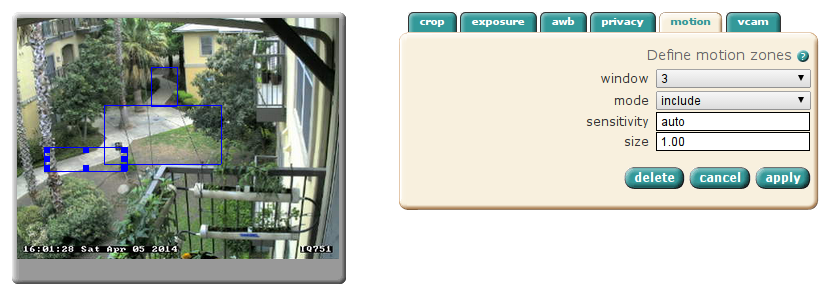
NTSC cameras are rather dumb. They do not contain a CPU or firmware, they simply scrape digital data from an imager, and convert that to analog NTSC video to be sent down the wire. There is no ability to add on-camera sofware to do motion analysis, or network operations such as emailing you images when certain conditions are met, such as motion, or external triggering devices.
Here, I've defined 3 motion detection windows

Some camera makers go way further than this and manufacture their IP cameras to be full-fledged surveillance and monitoring solutions, including things like motion analysis, on-board digital video recording, archival and viewing, and even custom software provided by 3rd parties to do things like plate recognition and computer vision, such as in manufacturing applications. Mobotix is a German high-end IP camera manufacturer offering this type of functionality.

Integration

Because so much intelligence resides on the camera, this requires that tools be created to interface with the camera to act on events or manage the capabilities of the camera. Most IP cameras provide simple HTTP APIs based on URL manipulation to configure and interact with IP cameras. This allows you to do interesting things like designing access control systems that allow your camera to listen to and play audio, and trigger things like door locks based on automated processes.

Conclusion

All in all, it makes the price difference of IP cameras vs analog cameras a moot point, if you are interested in high-quality video, making your video systems intelligent, or simplifying cabling!