Showing posts with label megapixel. Show all posts

Sunday, December 7, 2014

Tunneling live RTSP video on a port forwarded camera

There are some times where you may need to view live video on an IQeye H.264 camera that is behind a firewall.

Normally, the RTSP stream is accessible on port 554, which is fine if you have the ability to provision a public IP for each of your cameras.

But if you are behind a NAT, then the camera will have a port forwarding like port 8080 on the outside. How do you stream video if you cannot get to port 554 on the inside?

Use the RTSP over HTTP function in VLC!

First, configure VLC


  1. Go to Tools -> Preferences
  2. Click on the All radio button at the bottom
  3. Search for RTSP
  4. Select "Tunnel RTSP and RTP over HTTP"
  5. Set the HTTP tunnel port to the port forwarded port of your IQeye camera (let's use 8080 in this case)

Open a Network Stream


Use the path /rtsp/now.mp4 instead of just /now.mp4.

  1. Media-> Open Network Stream
  2. Enter 'rtsp://<ip_of_your_camera>:8080/rtsp/now.mp4' as the address (8080 is the example we are using)
  3. Click Play
Voila!

IQeye 3 Series Review

I recently picked up two IQ031S cameras, a model that supports full-motion H.264. I've always been a fan of the standard MJPEG IQeye cameras and wanted to try these ones out. They are the H.264 entry-level cameras featuring the Ambarella SoC solution running Linux. MSRP around $400-500 I think. I picked mine off eBay for about $100.

IQ031S Version V4.0/069(140501) Platform: 6b

At the time of this writing (late 2014), this model is still sold and supported, but some more interesting models like the Alliance-mini, and 7-series are more up-to-date in terms of hardware and features.

As usual with IQeye H.264 cameras, the streams are accessible with RTSP over HTTP tunneling (port 80)
rtsp://<camera_ip>/rtsp/now.mp4 primary stream
rtsp://<camera_ip>/rtsp/stream1 primary stream
rtsp://<camera_ip>/rtsp/stream2 secondary stream

When using this method, make sure you tell VLC to "tunnel RTSP over HTTP" in Settings, and set the tunnel port to 80 (or whatever your camera is on). See more on this in my "tunneling live video on a port forwarded camera" post.

Or directly with RTSP port 554
rtsp://<camera_ip>:554/now.mp4 primary stream
rtsp://<camera_ip>:554/stream1 primary stream
rtsp://<camera_ip>:554/stream2 primary stream

First Thoughts

My first thoughts are that the live motion with sound is amazing! It's a weird feeling to see live video when you are so used to MJPEGs low framerate. The keyframes seem to happen about every few seconds, and looking at the OID table for the camera, this is confirmed with the following:
OIDcurrent valuedefault valuerangedescription
1.17.2.5 3000 1000video iframe interval (ms) (read only)

It's a bit strange that the item is read-only but the value is not set to the default.

The form factor is nice. It's a compact camera, very similar to the IQeye 511 that I really like, but in a short bullet style housing, rather than being flat like the 511. The rear of the camera has a reset button and an Ethernet port. That's all. It must be powered over PoE.

The Ambarella SoC has some strange artifacting. In all conditions, the image always seems to lean toward a blue/purple tint. I feel like the color adjustment matrices programmed into the camera are not tuned properly for the sensor. Changing the white balance settings doesn't seem to help. There is no way to set spot white balance and point to that spot.

Telnet Interface

The camera does have a telnet interface, but most of the 'SET' commands from old cameras are not implemented. For example, I do not know how to set the camera to put the log output to a syslog server as on the older cameras. The new telnet command line seems more suited to setting OIDs. But if you're going to do that, you might as well use the HTTP request method (ie /set.oid?OidTR1.2.9.1.9.2=Whatever).

> show logging
Info: cmd_show_logging not yet implemented
ret=-1

So it looks like the developers haven't gotten around to adding logging features. See the post on "syslog logging for IQeye" to see the use-cases and benefits of the IQeye on-board logging feature.

The command "monitor" was added, which is basically the same as the "show" command, but runs in an infinite loop.

The netstat output is much more Linux-y, and this makes sense: the camera runs an embedded Linux.
>> netstat
Active Internet connections (servers and established)
Proto Recv-Q Send-Q Local Address           Foreign Address         State       
tcp        0      0 0.0.0.0:32008           0.0.0.0:*               LISTEN      
tcp        0      0 0.0.0.0:554             0.0.0.0:*               LISTEN      
tcp        0      0 0.0.0.0:943             0.0.0.0:*               LISTEN      
tcp        0      0 0.0.0.0:8080            0.0.0.0:*               LISTEN      
tcp        0      0 0.0.0.0:80              0.0.0.0:*               LISTEN      
tcp        0      0 0.0.0.0:21              0.0.0.0:*               LISTEN      
tcp        0      0 0.0.0.0:23              0.0.0.0:*               LISTEN      
tcp        0      0 0.0.0.0:2300            0.0.0.0:*               LISTEN      
tcp        0      0 192.168.16.137:36050    192.168.16.119:445      ESTABLISHED 
tcp        0      0 192.168.16.137:23       192.168.16.119:44090    ESTABLISHED 
tcp        0  24616 192.168.16.137:80       173.173.105.232:54754   ESTABLISHED 
udp        0      0 0.0.0.0:32768           0.0.0.0:*                           
udp        0      0 192.168.16.137:32769    209.118.204.201:123     ESTABLISHED 
udp        0      0 224.0.0.251:5353        0.0.0.0:*                           
udp        0      0 239.255.255.250:1900    0.0.0.0:*                           
udp        0      0 0.0.0.0:3702            0.0.0.0:*                           
Active UNIX domain sockets (servers and established)
Proto RefCnt Flags       Type       State         I-Node Path
unix  9      [ ]         DGRAM                      2348 /var/tmp/log
unix  2      [ ACC ]     STREAM     LISTENING       2372 /tmp/.imager_server
unix  2      [ ACC ]     STREAM     LISTENING       2385 /tmp/.trigger_server
unix  2      [ ACC ]     STREAM     LISTENING       2387 /tmp/.image_server
unix  2      [ ACC ]     STREAM     LISTENING       2438 /tmp/.audio_server
unix  2      [ ACC ]     STREAM     LISTENING       2477 /tmp/.oid_server
unix  3      [ ]         STREAM     CONNECTED     24646870 /tmp/.oid_server
unix  3      [ ]         STREAM     CONNECTED     24646869 
unix  3      [ ]         STREAM     CONNECTED     24639383 /tmp/.image_server
unix  3      [ ]         STREAM     CONNECTED     24639382 
unix  3      [ ]         STREAM     CONNECTED     24639381 /tmp/.imager_server
unix  3      [ ]         STREAM     CONNECTED     24639380 
unix  2      [ ]         DGRAM                    24639376 
unix  2      [ ]         DGRAM                      2670 
unix  2      [ ]         DGRAM                      2666 
unix  3      [ ]         STREAM     CONNECTED       2642 /tmp/.image_server
unix  3      [ ]         STREAM     CONNECTED       2639 
unix  3      [ ]         STREAM     CONNECTED       2641 /tmp/.imager_server
unix  3      [ ]         STREAM     CONNECTED       2638 
unix  3      [ ]         STREAM     CONNECTED       2637 /tmp/.oid_server
unix  3      [ ]         STREAM     CONNECTED       2636 
unix  3      [ ]         STREAM     CONNECTED       2631 /tmp/.oid_server
unix  3      [ ]         STREAM     CONNECTED       2630 
unix  2      [ ]         DGRAM                      2616 
unix  3      [ ]         STREAM     CONNECTED       2607 /tmp/.oid_server
unix  3      [ ]         STREAM     CONNECTED       2606 
unix  3      [ ]         STREAM     CONNECTED       2605 /tmp/.oid_server
unix  3      [ ]         STREAM     CONNECTED       2604 
unix  2      [ ]         DGRAM                      2498 
unix  3      [ ]         STREAM     CONNECTED       2494 /tmp/.trigger_server
unix  3      [ ]         STREAM     CONNECTED       2493 
unix  3      [ ]         STREAM     CONNECTED       2495 /tmp/.oid_server
unix  3      [ ]         STREAM     CONNECTED       2480 
unix  3      [ ]         STREAM     CONNECTED       2453 /tmp/.audio_server
unix  3      [ ]         STREAM     CONNECTED       2449 
unix  3      [ ]         STREAM     CONNECTED       2425 /tmp/.trigger_server
unix  3      [ ]         STREAM     CONNECTED       2424 
unix  3      [ ]         STREAM     CONNECTED       2408 /tmp/.image_server
unix  3      [ ]         STREAM     CONNECTED       2407 
unix  3      [ ]         STREAM     CONNECTED       2406 /tmp/.imager_server
unix  3      [ ]         STREAM     CONNECTED       2405 
unix  2      [ ]         DGRAM                      2401 
unix  3      [ ]         STREAM     CONNECTED       2404 /tmp/.image_server
unix  3      [ ]         STREAM     CONNECTED       2400 
unix  3      [ ]         STREAM     CONNECTED       2399 /tmp/.imager_server
unix  3      [ ]         STREAM     CONNECTED       2398 
unix  2      [ ]         DGRAM                      2351 

Image Sharpness

Even with sharpness set to "High" in the web UI, the actual OID for sharpness is not changed. They appear to be completely separate OIDs (1.2.3 and 1.2.40.2). The sharpness just never gets to the level I am used to on the older cameras unless I manually set OID 1.2.40.2 and make sure the Web UI sharpness is set to High.

http://cam_url/set.oid&oidTB1.2.40.2=0
sharpen 0/100
sharpen 100/100
sharpen 35/100

Again, it's a bit surprising that this is not exposed in the web UI.

Other

IQrecorder is completely absent from this camera. I think that IQinvision must have realized that their cameras are often used in centralized environments, so having onboard camera DVR wasn't as desireable as it once was, when megapixel cameras were a niche and expensive item where you'd own maybe 1-5 instead of a fleet of them.

Video recording always seems to record 3MB at a time and no more, I couldn't get this to work at all either with triggers to SMB drives, or FTP, or using the Direct-to-Storage "DTS" feature. But I like JPEG frames anyway :-)

No fine-grained motion windows, the window is broken into a series of squares in a grid. On older IQeye models, or models without H.264, this can be set to an exact pixel range.

If you plan on integrating your IQeye camera into a custom solution, then the IQeye 3 series is likely not a great choice. It is better suited to live viewing where you require real-time video.

One thing I noted about this camera in the current firmware version is that Dynamic Print variables are not supported in the text overlays. This is useful for things like putting the time of the camera's last trigger event into the image, for example. The syntax is $O(x.x.x.x) where x are the integers for the OID in question.

Another thing I noticed is that I cannot customize webpages over the built-in FTP server running on the camera. It actively refuses FTP connections, so you cannot play with the filesystem at all like you could with the older models. I looked for an OID or telnet command to enable this and could not find one. I was hoping to get access to the filesystem to see what those /tmp/.image_server etc files are (see netstat above) and what you can get from them.

One positive to note is that on the older cameras, you could choose to have a timelapse image taken automatically and uploaded OR you could do motion detection and event upload, but not both. The IQeye 3 series let's you do both!

Pros

  • Fast interface
  • Compact design
  • Included mounting hardware
  • Live motion with audio!
  • Actively maintained firmware
  • Supports HTTPS
  • Supports SNMP
  • Simultaneous timelapse and motion triggers
  • Multiple streams
  • Supports RTSP over HTTP tunneling for firewalled environments
  • Windows File Share (SMB) destination support

Cons

  • No privacy masks (the feature is completely absent)
  • No scaling/subwindows (ie '?ds=2' not supported) you must always get a full res frame
  • No motion-only data scraping (ie '?snap=spush1&pragma=motion&noimage')
  • Little telnet functionality
  • No spot-based white balance calibration
  • Post-processing is spotty, JPEG still image quality not as good as MJPEG models
  • Basic settings "hidden" in web UI, requires setting OIDs manually
  • Logging facilities absent
  • Gain method settings missing (clipaverage, peakdetect, darkdetect, average)
  • Exposure window exclusions missing
  • Changes in exposure settings and window require reboots
  • Bitrate for both primary and secondary H.264 streams must be the same

Sunday, April 13, 2014

IQeye Pricing

IP cameras used to be very expensive devices. The prices have dropped dramatically just in the last 2 years, and used cameras of megapixel quality are available for quite a deal. Even new cameras are affordable, especially Chinese models and knock-offs on eBay.

Here are some prices you can expect to get for used IQeye cameras by IQinvision as of June 2014. This will give you a better idea of how to negotiate.

These are prices without lenses, unless otherwise noted.

IQ511 $40
IQ541 $45
IQ542 $50
IQ702 $60
IQ703 $65
IQ711 $50
IQ732N $110
IQ751 (Day/Night) $65
IQ752 (Day/Night) $70
IQ753 (Day/Night) $80
IQ801 $80
IQ802 $90
IQ803 $100
IQ832N (Day/Night) $130
IQ851 (Day/Night) $100
IQ852 (Day/Night) $110
IQ853 (Day/Night) $130
IQM31N (Day/Night) lens included $100
IQM32N (Day/Night) lens included $120
IQA13N (Day/Night) lens included $100
IQ030S lens included $65
IQ031S lens included $75
IQ032S lens included $85
IQ040S lens included $50
IQ041S lens included $60
IQ042S lens included $70

For comparison, in 2006 an IQ511 would sell for over $800!

Some explanation of the methodology behind this:
  • Outdoor cameras are more expensive than indoor, because of the weatherproof box in addition to the camera itself.
  • Higher resolution cameras are more expensive than lower resolution ones...go figure.
  • Night/Day cameras (anything with an "N" in the list above) are more expensive, as they have a movable IR-Cut filter. This mechanical component is more expensive to implement. Or you can do it cheaply like Foscam does. They have an endemic problem with this on their cheaper models.
  • No IQeye cameras are wireless
  • Most IQeye cameras do not come with lenses, cameras with lenses are more expensive
  • Cameras with H.264 are more expensive

Saturday, April 5, 2014

Why use IP cameras over webcams or analog cameras?

I've asked myself this very question before, many times!

It used to be that IP cameras were very expensive. Most large deployments of CCTV systems would use analog cameras due to the high per-unit cost of IP cameras. Also, the reliability of early IP cameras was not fantastic, due to the early implementations of the technology mixed with the number of tasks that IP cameras were expected to perform, given their higher cost.

Around 2007 when I started looking into my own CCTV setups, the solution used to be to spend $60/each on analog NTSC cameras, run coax and power cables to a computer with lots of capture inputs. 4-input capture cards could be had for $25/each on eBay at that time. This meant your first camera cost only $85, and this cost scales down for each additional camera, because no additional capture hardware is necessary until you exceed the inputs on your capture card or the processing limits of your PC.

Alternatively, USB cameras were considered an option due to their relatively low cost and the ability to get higher resolutions as compared to analog cameras, but this meant having a USB host (read: computer) do the encoding and handling of the video, which contributed to high cost and poor scalability. USB cables can only be run for about 12 feet, and entailed the extra complexity of managing computers and software to keep them running properly. However, if you were say, Catherine and her Bird Boxes, and your computer was very close to the place you wanted to take video, then it was an acceptable solution.

At that time (2007), IP cameras were not readily available for prices under $300, and this cost did not scale down over time as you added cameras.

This has changed now that ARM CPUs with integrated processing, and good CMOS sensors can be packaged into IP cameras that are easily under $100 each.

Here are some benefits of using digital IP cameras over analog.

Single cable

Most IP cameras utilize a single Ethernet cable that provides both control/image data with power using the 802.3af (Power over Ethernet, or PoE) standard. This means that only a single cable is required for each camera.

Progressive scan

Most IP cameras are progressive scan, which means that every frame contains a full image, not an alternating field of lines as with analog cameras. Analog video, called NTSC video, functions by sending half resolution frames at 60Hz, which tricks the human eye into thinking that a full resolution image is being seen at 30Hz or 30 frames per second. It's a hack to get around the fact that there was not enough technology to deliver full frames at 480lines at 30 frames per second for most of TV's history.

Interlaced video is fine in most cases, except in high-motion situations. In high-motion scenes, the subject will often move slightly between the time that the first and second set of lines (or fields) are captured, resulting in two half frames with slightly different images. This results in the combing effect as seen below, where the car has moved between each frame.


In contrast, IP cameras, and USB cameras for that matter, scrape an image in it's entirety, from top to bottom, every time an image is captured, which means that the resulting video is individual full frames, with no interlacing artifacts.

The exception to the rule, that I've seen, is some Panasonic IP cameras. These cameras seem to take an analog camera chip and capture it with an Analog to Digital Converter (ADC), and so, when there is movement, the camera exhibits the jagged lines phenomenon of interlaced video. These cameras are big in Japan, I have tons of streams to these cameras, here's a Japanese Giraffe, and a house! I'll leave it up to the intrepid readers to transcribe the URL ;-)


High resolution

On the same token as the interlaced limitation of NTSC, the NTSC standard defines only 480 lines of "resolution". There is no possible way to get more resolution out of an analog camera (except for HD-SDI and some new technologies that are not standard). Cameras that advertise 700TVL (TV lines) of resolution are simply not capable of delivering on this promise, as they are limited to 480lines of interlaced image data. That's it, that's all.

480TVL, especially interlaced, just isn't enough resolution to catch details like facial features, or license plate numbers.

IP cameras, which create JPEG images, can support arbitrary frame sizes. 5MP (2560x1920) IP cameras are common, this is 64 times the image data of a 320x240 half-frame of NTSC! This sort of resolution can be had for under $200 (April 2014), such as with an IQinvision IQeye 855.


One of the early arguments for IP cameras was the ability to have one camera perform the function of many analog cameras with the same performance. A lower end 1280x1024 IP camera contains the as much image data as 4 NTSC cameras, without the jitter and blurriness of analog video.

Standards compliant, yet flexible

TCP/IP is a standard, and allows transmission of other data than just images. Analog cameras can only send image data over the coaxial cable. A TCP/IP connection over Ethernet can support email, FTP, camera PTZ control, and myriad other services.

Most IP cameras have standardized on MJPEG as the image standard. MJPEG is simply a stream of JPEG images, JPEG being one of the most widely developed image formats in the world! Newer cameras offer better compression, and features like audio, using H.264 (MPEG-4) streams.

On-camera intelligence

NTSC cameras are rather dumb. They do not contain a CPU or firmware, they simply scrape digital data from an imager, and convert that to analog NTSC video to be sent down the wire. There is no ability to add on-camera sofware to do motion analysis, or network operations such as emailing you images when certain conditions are met, such as motion, or external triggering devices.
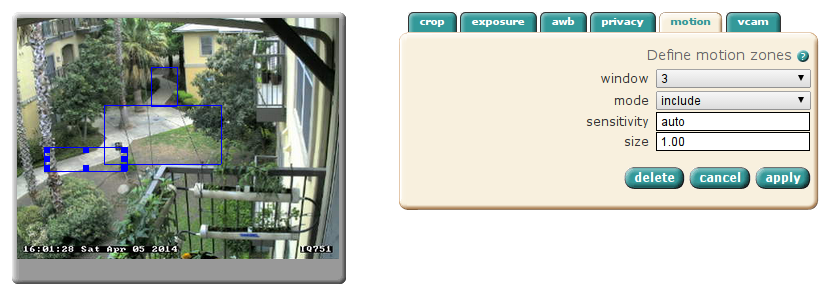
Here, I've defined 3 motion detection windows

Some camera makers go way further than this and manufacture their IP cameras to be full-fledged surveillance and monitoring solutions, including things like motion analysis, on-board digital video recording, archival and viewing, and even custom software provided by 3rd parties to do things like plate recognition and computer vision, such as in manufacturing applications. Mobotix is a German high-end IP camera manufacturer offering this type of functionality.

Integration

Because so much intelligence resides on the camera, this requires that tools be created to interface with the camera to act on events or manage the capabilities of the camera. Most IP cameras provide simple HTTP APIs based on URL manipulation to configure and interact with IP cameras. This allows you to do interesting things like designing access control systems that allow your camera to listen to and play audio, and trigger things like door locks based on automated processes.

Conclusion

All in all, it makes the price difference of IP cameras vs analog cameras a moot point, if you are interested in high-quality video, making your video systems intelligent, or simplifying cabling!