Showing posts with label netcam. Show all posts

Sunday, December 7, 2014

Tunneling live RTSP video on a port forwarded camera

There are some times where you may need to view live video on an IQeye H.264 camera that is behind a firewall.

Normally, the RTSP stream is accessible on port 554, which is fine if you have the ability to provision a public IP for each of your cameras.

But if you are behind a NAT, then the camera will have a port forwarding like port 8080 on the outside. How do you stream video if you cannot get to port 554 on the inside?

Use the RTSP over HTTP function in VLC!

First, configure VLC


  1. Go to Tools -> Preferences
  2. Click on the All radio button at the bottom
  3. Search for RTSP
  4. Select "Tunnel RTSP and RTP over HTTP"
  5. Set the HTTP tunnel port to the port forwarded port of your IQeye camera (let's use 8080 in this case)

Open a Network Stream


Use the path /rtsp/now.mp4 instead of just /now.mp4.

  1. Media-> Open Network Stream
  2. Enter 'rtsp://<ip_of_your_camera>:8080/rtsp/now.mp4' as the address (8080 is the example we are using)
  3. Click Play
Voila!

Thursday, July 3, 2014

Embedded EXIF data in IQeye camera images

Exiftool is a PERL utility to read extra metadata from JPEG images. This metadata is often used to store things like camera attributes and even GPS data in modern consumer cameras including phone cameras.

Turns out IQeye cameras write some metadata to images.

Using EXIFtool to view JPEG metadata

$ exiftool -a 09_06_31.trig+00.jpg

Establishing Patterns

For images captured as part of a motion event (FTP'd direct from camera to NAS):

Comment                         : P..L0;exacq1400510841.748exacq
Comment                         : {"IQimage":{"sequence":529057,"time":1400510841748,"event":["motion"],"motionWindows":[2],"imgjdbg":" 291/020:20/480/005:081/107/07/4/50/70/20/17:06/07/06:d4"}}

The first comment, containing the garbage characters, is actually the MAC of the camera. Expressed in HEX, it's something like:

JPEG COM (7 bytes):
    0018: 00 50 1a 02 2c be 3b [.P..,.;]

3b is a product code. This is documented by IQinvision, and I am gathering a list of camera models.

You see that on motion events, there is some extra data after the MAC, flanked with 'exacq'.

If you noticed the curly braces, you may have thought that the second comment is JSON. You'd be right :-)

{
    "IQimage": {
        "sequence": 529057,
        "time": 1400510841748,
        "event": [
            "motion"
        ],
        "motionWindows": [
            2
        ],
        "imgjdbg": " 291/020:20/480/005:081/107/07/4/50/70/20/17:06/07/06:d4"
    }
}

Seems IQinvision has some clever engineers!

Complete Event Sequence

Here is the EXIF metadata for a complete motion event. The first 3 images are "prebuffer" as set in the camera so that we can see the lead-up to the motion event. Highlighted in green is the motion status across the sequence.

11_09_34.trig-03.jpg
Comment                         : P..L0;exacq1399046974.310exacq
Comment                         : {"IQimage":{"sequence":2315889,"time":1399046974310,"event":["none"],"imgjdbg":" 436/067:32/120/016:077/110/01/4/50/60/15/17:21/24/24:bb"}}

11_09_34.trig-02.jpg
Comment                         : P..L0;exacq1399046974.878exacq
Comment                         : {"IQimage":{"sequence":2315898,"time":1399046974878,"event":["none"],"imgjdbg":" 436/067:32/120/016:077/110/01/4/50/60/15/17:21/24/24:bb"}}

11_09_34.trig-01.jpg
Comment                         : P..L0;exacq1399046974.944exacq
Comment                         : {"IQimage":{"sequence":2315899,"time":1399046974944,"event":["none"],"imgjdbg":" 436/067:32/120/016:077/110/01/4/50/60/15/17:21/24/24:bb"}}

11_09_35.trig+00.jpg
Comment                         : P..L0;exacq1399046975.011exacq
Comment                         : {"IQimage":{"sequence":2315900,"time":1399046975011,"event":["motion"],"motionWindows":[1],"imgjdbg":" 436/067:32/120/016:077/110/01/4/50/60/15/17:21/24/24:bb"}}


The last image has the motion, and this is why the status changes. See also that the motion images include the exacq data (timecode) whereas non-motion trigger event JPEGs do not.

The fields are:
  1. sequence - Not sure what this is based on, but it increments
  2. time - precise time
  3. event - type of event (none, trigger, motion)
  4. imgjdbg - unknown

Timelapse Image Sequences

Comment                         : P..,�;
Comment                         : {"IQimage":{"sequence":2380675,"time":1402422546407,"event":["none"],"imgjdbg":" 274/020:16/960/013:083/097/01/4/50/70/20/17:08/09/07:e2"}}
Comment   

Manually Downloaded Images

So far, we've looked at images that are FTPd directly by the camera to storage, both on the periodic basis and motion event basis.

So, what happens if you download now.jpg when there is a trigger occurring in the image? In the case of using the http://camera/now.jpg feature of IQeye cameras.

Well, you also get trigger data!

$ exiftool -a now\ \(1\).jpg |grep Comment
Comment                         : P..,�;
Comment                         : {"IQimage":{"sequence":20980184,"time":1404396373253,"event":["motion"],"motionWindows":[7],"imgjdbg":" 298/016:22/480/008:085/099/01/4/55/70/20/17:06/09/06:47"}}

$ exiftool -a now\ \(2\).jpg |grep Comment
Comment                         : P..,�;
Comment                         : {"IQimage":{"sequence":20980241,"time":1404396378202,"event":["motion"],"motionWindows":[6],"imgjdbg":" 298/016:22/480/008:085/099/01/4/55/70/20/17:06/09/06:47"}}

$ exiftool -a now\ \(3\).jpg |grep Comment
Comment                         : P..,�;
Comment                         : {"IQimage":{"sequence":20980453,"time":1404396395825,"event":["motion"],"motionWindows":[6],"imgjdbg":" 298/016:22/480/008:085/099/01/4/55/70/20/17:06/09/06:47"}}

Surprisingly, none of this is documented in the IQeye reference manuals...and I've been very impressed with their customer service and documentation. I've reached out to them for some more explanation of what that imgjdbg tag is.

Saturday, April 5, 2014

Why use IP cameras over webcams or analog cameras?

I've asked myself this very question before, many times!

It used to be that IP cameras were very expensive. Most large deployments of CCTV systems would use analog cameras due to the high per-unit cost of IP cameras. Also, the reliability of early IP cameras was not fantastic, due to the early implementations of the technology mixed with the number of tasks that IP cameras were expected to perform, given their higher cost.

Around 2007 when I started looking into my own CCTV setups, the solution used to be to spend $60/each on analog NTSC cameras, run coax and power cables to a computer with lots of capture inputs. 4-input capture cards could be had for $25/each on eBay at that time. This meant your first camera cost only $85, and this cost scales down for each additional camera, because no additional capture hardware is necessary until you exceed the inputs on your capture card or the processing limits of your PC.

Alternatively, USB cameras were considered an option due to their relatively low cost and the ability to get higher resolutions as compared to analog cameras, but this meant having a USB host (read: computer) do the encoding and handling of the video, which contributed to high cost and poor scalability. USB cables can only be run for about 12 feet, and entailed the extra complexity of managing computers and software to keep them running properly. However, if you were say, Catherine and her Bird Boxes, and your computer was very close to the place you wanted to take video, then it was an acceptable solution.

At that time (2007), IP cameras were not readily available for prices under $300, and this cost did not scale down over time as you added cameras.

This has changed now that ARM CPUs with integrated processing, and good CMOS sensors can be packaged into IP cameras that are easily under $100 each.

Here are some benefits of using digital IP cameras over analog.

Single cable

Most IP cameras utilize a single Ethernet cable that provides both control/image data with power using the 802.3af (Power over Ethernet, or PoE) standard. This means that only a single cable is required for each camera.

Progressive scan

Most IP cameras are progressive scan, which means that every frame contains a full image, not an alternating field of lines as with analog cameras. Analog video, called NTSC video, functions by sending half resolution frames at 60Hz, which tricks the human eye into thinking that a full resolution image is being seen at 30Hz or 30 frames per second. It's a hack to get around the fact that there was not enough technology to deliver full frames at 480lines at 30 frames per second for most of TV's history.

Interlaced video is fine in most cases, except in high-motion situations. In high-motion scenes, the subject will often move slightly between the time that the first and second set of lines (or fields) are captured, resulting in two half frames with slightly different images. This results in the combing effect as seen below, where the car has moved between each frame.


In contrast, IP cameras, and USB cameras for that matter, scrape an image in it's entirety, from top to bottom, every time an image is captured, which means that the resulting video is individual full frames, with no interlacing artifacts.

The exception to the rule, that I've seen, is some Panasonic IP cameras. These cameras seem to take an analog camera chip and capture it with an Analog to Digital Converter (ADC), and so, when there is movement, the camera exhibits the jagged lines phenomenon of interlaced video. These cameras are big in Japan, I have tons of streams to these cameras, here's a Japanese Giraffe, and a house! I'll leave it up to the intrepid readers to transcribe the URL ;-)


High resolution

On the same token as the interlaced limitation of NTSC, the NTSC standard defines only 480 lines of "resolution". There is no possible way to get more resolution out of an analog camera (except for HD-SDI and some new technologies that are not standard). Cameras that advertise 700TVL (TV lines) of resolution are simply not capable of delivering on this promise, as they are limited to 480lines of interlaced image data. That's it, that's all.

480TVL, especially interlaced, just isn't enough resolution to catch details like facial features, or license plate numbers.

IP cameras, which create JPEG images, can support arbitrary frame sizes. 5MP (2560x1920) IP cameras are common, this is 64 times the image data of a 320x240 half-frame of NTSC! This sort of resolution can be had for under $200 (April 2014), such as with an IQinvision IQeye 855.


One of the early arguments for IP cameras was the ability to have one camera perform the function of many analog cameras with the same performance. A lower end 1280x1024 IP camera contains the as much image data as 4 NTSC cameras, without the jitter and blurriness of analog video.

Standards compliant, yet flexible

TCP/IP is a standard, and allows transmission of other data than just images. Analog cameras can only send image data over the coaxial cable. A TCP/IP connection over Ethernet can support email, FTP, camera PTZ control, and myriad other services.

Most IP cameras have standardized on MJPEG as the image standard. MJPEG is simply a stream of JPEG images, JPEG being one of the most widely developed image formats in the world! Newer cameras offer better compression, and features like audio, using H.264 (MPEG-4) streams.

On-camera intelligence

NTSC cameras are rather dumb. They do not contain a CPU or firmware, they simply scrape digital data from an imager, and convert that to analog NTSC video to be sent down the wire. There is no ability to add on-camera sofware to do motion analysis, or network operations such as emailing you images when certain conditions are met, such as motion, or external triggering devices.
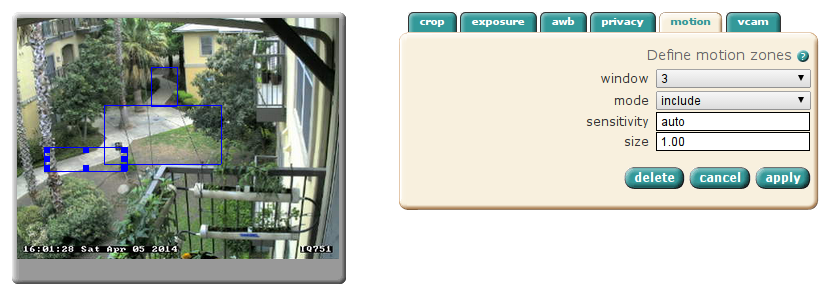
Here, I've defined 3 motion detection windows

Some camera makers go way further than this and manufacture their IP cameras to be full-fledged surveillance and monitoring solutions, including things like motion analysis, on-board digital video recording, archival and viewing, and even custom software provided by 3rd parties to do things like plate recognition and computer vision, such as in manufacturing applications. Mobotix is a German high-end IP camera manufacturer offering this type of functionality.

Integration

Because so much intelligence resides on the camera, this requires that tools be created to interface with the camera to act on events or manage the capabilities of the camera. Most IP cameras provide simple HTTP APIs based on URL manipulation to configure and interact with IP cameras. This allows you to do interesting things like designing access control systems that allow your camera to listen to and play audio, and trigger things like door locks based on automated processes.

Conclusion

All in all, it makes the price difference of IP cameras vs analog cameras a moot point, if you are interested in high-quality video, making your video systems intelligent, or simplifying cabling!

An Introduction Network Cameras (and this blog)

Geocamming

For awhile, I've been a "geocammer". Geocamming is a Internet hobby where you look for network camera streams. There are thousands of live camera streams from all over the world, some very high quality and some with sound!

About Network Cameras (or IP Cameras)

Netcams differ from webcams in that webcams are often associated with USB cameras attached to computers to do 1-on-1 chats, etc. In contrast, netcams are tiny computers, also called embedded devices, that you connect to directly and are usually streaming images 24x7. They are also commonly referred to as "IP cameras", and in this context they are often used in CCTV applications. In fact, most of the streaming netcams I have found on the Internet appear to be surveillance systems that have been left open to the WWW knowingly or unknowingly.

There are a couple of things that are interesting about viewing webcams:
  • The ability to see how people live their lives in near and far away places, and what the seasons look like in, say, Japan
  • The ability to view live streams from very remote locations. Some of the netcams I've found are solar powered wireless stations!
  • The slightly voyeuristic nature of peeking into those places
  • Just checking in to see what the weather is like, and maybe seeing somewhere you'd like to travel to!
  • Seeing what a camera is being used for, and exploring the features of whatever camera you are currently viewing

That's all well and good, but...

One thing that is very frustrating to me about finding and viewing netcams is that they are too often littered by ads, or requiring Java or Flash plugins to view.

Here is an example of a crappy site, by Tourisme-Montréal of all people! Here the domain name is montrealcam.com, but there is not a single netcam visible here--it's full of static photos, some links to YouTube videos, and ads.


Thankfully, using some Google foo, and reputable cam sites, you can find the raw streams that are served up by the embedded devices themselves, and most of the time, due to the cost of these cameras (many are in the $500+ range as of 2014, and even more, back in 2006 when I started geocamming), the owners do a good job of positioning them well, and maintaining focus, cleaning the lenses, etc.

Here are some interesting sample images from some good cameras, direct from the source!
Germany, a marketplatz

A view of the sea, from Japan!

Basically

I wanted a place to put information I've learned along the way. This blog will be mostly technical in nature, I'll add the label "technical" to any article that is technical, but there will be some posts that are purely fun, like time-lapses from cameras I've found, and also to my own cameras. We'll see how long I can keep it up!